[おしらせ]
— 任天堂サポート (@nintendo_cs) July 23, 2026
Nintendo Switch 2 ソフト『スプラトゥーン レイダース』をプレイいただいているお客様より「タンクを強化する場面で、リミッターを解除しようとしても解除できない。」とのお問い合わせをいただいています。… pic.twitter.com/KehKkK0mKG
Splatoon Raiders gets a new update improving the game’s most confusing menu option
The version 1.1.1 update makes it easier to release the Tank Limiter
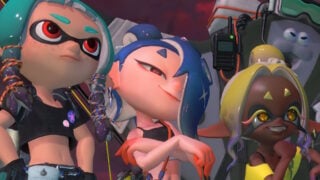
Nintendo has released a new update for Splatoon Raiders which reworks one of its most confusing options.
After the release of the game, a number of players started reporting that they were having trouble with the Tank Limiter feature.
The Tank Limiter is a cap placed on the game’s Skill Points system, which stops players spending too many Skill Points on a certain trait (such as health or weapon power) too early in the game.
Once a certain number of Skill Points have been spent across a number of categories, players then get the option to release the Tank Limiter, which increases the cap and lets players spend more Skill Points on each trait.
Players were reporting that the option to release the Tank Limiter wasn’t working, when in reality the issue was more down to UI design.
To activate the option, players have to hold the A button down for a while, instead of simply pressing it. This has been confusing players in a game where practically every other menu option is chosen with a simple button press, leading some to repeatedly press the button and believe it wasn’t working.
The issue was reported so often that Nintendo‘s Japanese customer support page had to post a message on X telling players to hold the button down instead of pressing it, but now the game’s latest patch just replaces the mechanic entirely.
Now, to release the Tank Limiter, players simply have to press the A button normally, as they do with almost every other option in the game.
The full patch notes for Version 1.1.1 of Splatoon Raiders are as follows:
Splatoon Raiders – Version 1.1.1 patch notes
- When releasing a tank’s limiter, you can now release it without holding down the A Button.
- Fixed an issue in which the feature to hide elements like the Showstopper Gauge when you don’t push any buttons for a certain period of time in the Hideout Ship or dungeons wasn’t working as intended.
- Fixed an issue in which the Emergency Damage Up effect was not applied to explosion damage added with the Splatchet’s Explosive Steps.
- Fixed an issue in which you occasionally couldn’t move after using a Splatchet immediately after having done a Squid Roll from a wall.
- Fixed an issue in Soyu Cliffs, in which a Fish Stick would occasionally move into the terrain and could not be defeated.
- Fixed an issue in Hopping, which you can play on the Arcade Cabinet, in which the Exploration Bot would occasionally stop hitting Salmonids.
- Fixed an issue in which the game could crash if you tapped the Nintendo Switch 2 touchscreen on the screen where the fog swirls after launching the game.
- Several other adjustments have been made to improve the gameplay experience.







Some external links on this page are affiliate links, if you click on our affiliate links and make a purchase we might receive a commission.