Aion 2 fix: ‘Character creation restricted’ solution and workarounds
How to solve the ‘Character creation restricted’ bug so you can start playing Aion 2

Aion 2 is out now, but if your PC isn’t set up correctly, then you won’t even be able to finish making a character.
Sounds strange, but it’s true. Aion 2 is a bit sensitive, and it expects your PC to work in a certain way that the QA team probably didn’t double-check.
In this guide, we’re breaking down how to solve the “character creation restricted” bug – or workaround it if your account has more severe issues – in Aion 2.
Method #1: Automatic Time and Date settings – Aion 2
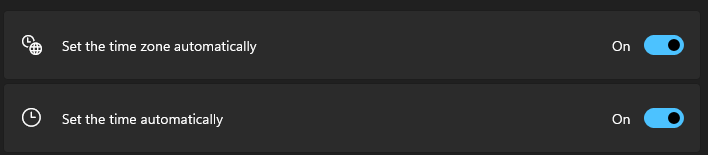
Close the game, as we’ll have to adjust some PC settings. This first one is easiest to do, and if these settings are not set correctly, then this is probably all you need to do.
- Navigate to the Date & Time settings menu on your PC. This can be done by hovering over the clock on the taskbar, right-clicking, and selecting ‘Adjust date and time’.
- Ensure both ‘Set the time zone automatically’ and ‘Set the time automatically’ are enabled.
If either of those settings were disabled, turning them on and booting up the game should see the issue now solved. If you’re still having problems, move on to Method #2.
Method #2: IP settings – Aion 2
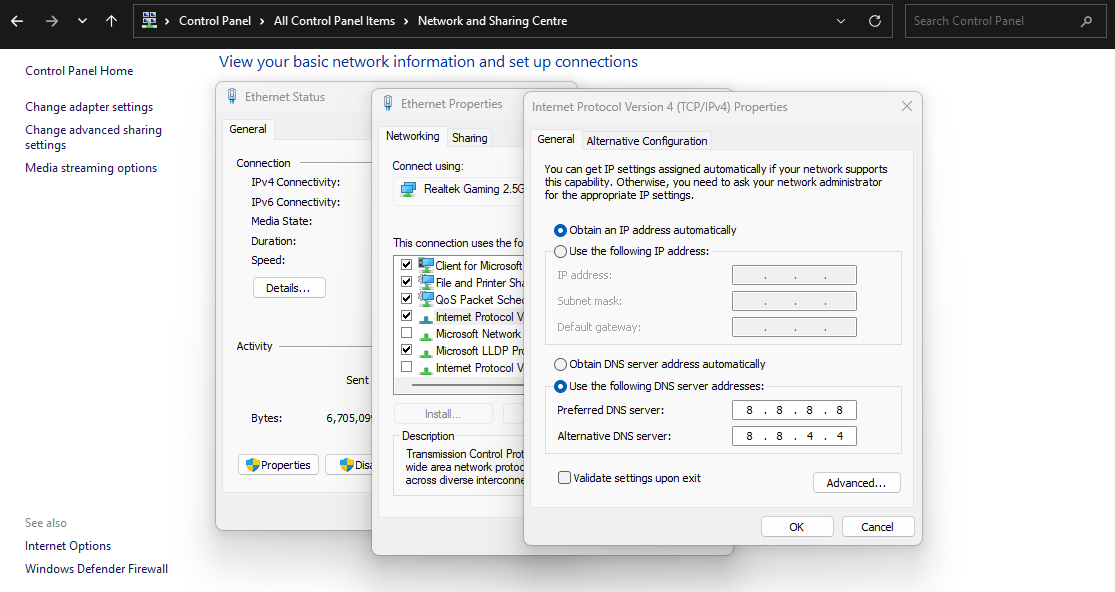
If you’re still having problems, changing your IP settings might solve this. Note: you should only change these settings if you know what you are doing and are confident in reverting any changes should anything go wrong.
- Open Control Panel.
- Open Network and Sharing Center.
- Click ‘Change adapter settings’.
- Double-click the network you are using.
- Click Properties.
- Highlight ‘Internet Protocol Version 4 (TCP/IPv4)’ and click Properties.
- Top setting should be ‘Obtain an IP address automatically’.
- Change the bottom setting to ‘Use the following DNS server addresses:’ and use the following:
- Preferred DNS Server: 8.8.8.8
- Alternative DNS server: 8.8.4.4
- Click OK.
Now try launching the game again. This settings change may have fixed any problems you were experiencing. If not, move on to the third and final method.
Method #3: VPN – Aion 2
If the above changes still haven’t solved your issues, it may be that your account has been flagged, and we’ll need to work around that problem so you can keep playing.
For this, you’ll need to use a VPN set to Taiwan and create a new game account for the Taiwan region. That really is the only solution if your account or IP has been flagged and banned, so let’s hope that it doesn’t come to this.